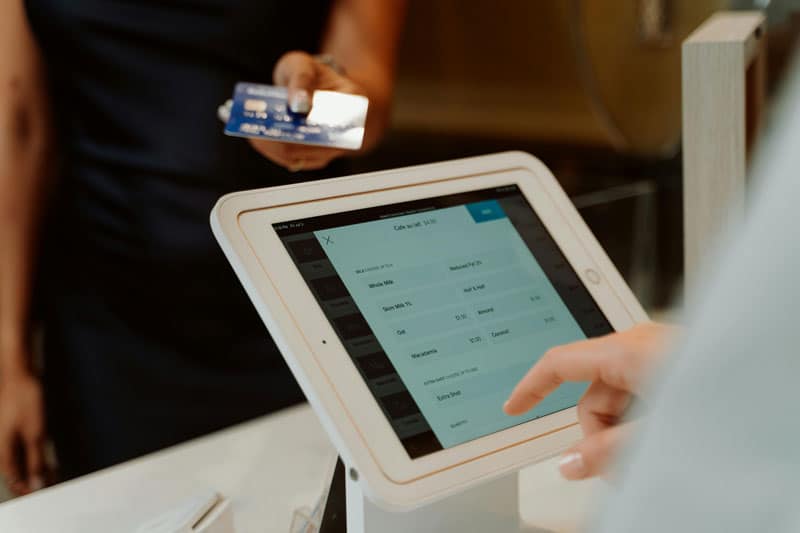

A payment terminal is no longer just a card reader. It is the door to your revenue. In 2026, customers expect contactless payments to work instantly, receipts to accurately reflect what they charged customers, and effortless refunds. If the payment terminal produces slow transactions, dropped connections, and incorrect receipts, it will cost you sales and create operational chaos. Choosing the right payment terminal is one of the simplest ways to protect your sales and operations.
Payment Terminal vs POS Terminal Hardware: What You Are Actually Buying
A payment terminal is the device that accepts payments and submits them for authorization. The POS terminal hardware includes the payment terminal, register, tablet, barcode scanner, cash drawer, kitchen printer, and software. Many people will find themselves in a situation where they bought a great payment device that does not suit the business environment. The best solution is to choose between a payment terminal and a POS terminal based on the business’s requirements and the sales environment.
The Core Terminal Hardware Options in 2026
Countertop, mobile, tablet, and unattended are the four primary types. Countertop terminals are great when you need a terminal in a fixed location. Handheld terminals are ideal when you need to move from location to location quickly. Tablet-based readers are great for small businesses and teams. Finally, unattended terminals are essential for kiosks and self-service in high-traffic areas.
Security and Compliance Basics for Payment Terminals
The choice of payment terminal has significant implications for fraud and compliance. Any modern payment terminal should support EMV chip and contactless payments and provide data security for the sensitive payment data. The ideal payment terminal should meet the data security requirements of the current PCI standards for payment environments and avoid workarounds that expose sensitive data. For the best security, sensitive data should be kept in secure environments and restricted to those authorized to issue refunds, make manual entries, or change device settings.
Connectivity, Uptime, and Offline Mode
Reliability is not a feature but the cost of doing business. For fixed terminals, Ethernet connection is the best option. For mobile sales, Wi-Fi and cellular data connections are more important. If you are in an area with weak signal connections, check how the terminal handles being offline. The best hardware for the terminal will be the one that fits your risk and your connectivity situation.
POS Terminal Hardware Features That Impact Speed at Checkout
Although the speed you see at checkout reflects the entire checkout process, the features of POS terminal hardware can significantly impact the speed of transactions. For example, the hardware must be able to scan quickly, accept tips and discounts, and print or send receipts. The payment terminal must also handle customer taps, as any delay in response will require customers to tap twice to complete the transaction. Returns also mean that the hardware must support easy, traceable refunds.
Integration and Reporting Considerations
The usefulness of a payment terminal depends on the kind of reports it produces. Make sure your POS terminal hardware is configured to record sales in a way that makes it easy to determine what happened in the event of a problem. If you use accounting, inventory, and CRM software, ensure the software integrates with your POS hardware before you purchase the hardware. Good accounting and reporting software will make it easy to reconcile your books and resolve any disputes that may arise.
Total Cost of Ownership for Terminal Hardware and Support
The total cost of ownership for terminal hardware and support includes more than the initial purchase price. There are costs associated with replacing terminal hardware, replacing warranties, handheld battery degradation, and accessing and using the accessories that come with the terminal. Additionally, the choice of terminal hardware can lock a company into using a particular processor.
Payment Terminal Selection Checklist by Business Type
Retail Counters and High Throughput Lines
For retail counters or high throughput, you need a payment terminal that allows contactless and quick chip payments. The POS terminal hardware should work well with different scanners and cash drawers. With high throughput, the hardware needs to be reliable, as there will be periods of high demand and a lot of transactions.
Restaurants and Hospitality
For hospitality businesses, a fast payment terminal that can handle tips well is required. The handheld devices allow for faster service, but only if the Wi-Fi is good and the device has good battery life. The best POS terminal hardware for hospitality also prints receipts and allows for easy adjustments.
Field Service and On-the-Go Sellers
For field service and on-the-go sales, a mobile payment terminal is required. The mobile terminal should work over cellular data and provide fast access to receipts and issuing refunds. The hardware should eliminate the temptation to take card details via text or email. This hardware provides protection for the organization.
Pop-Ups, Events, and Seasonal Stalls
For running payment terminals at events, the focus should be on the robustness of the terminal hardware. The payment terminal must work quickly and efficiently even in environments with poor connectivity. The risk is getting duplicate charges on the customer’s card. Therefore, the POS terminal hardware you choose should minimize this risk.
Multi-Location Operators
For multi-location businesses, a payment terminal that is easy to manage from a central location is ideal. Consistent device and software settings are required for all locations. Choosing a consistent terminal hardware setup will reduce the likelihood of making errors in the transaction process. Selecting a few different devices and ensuring they are all configured the same is best.
High-Risk or High-Ticket Merchants
For high-ticket sales, such as selling luxury items, having a payment terminal with strong verification and documentation is essential. This gives better protection against chargeback and payment disputes. Some models also allow manual entry and manager refunds. Ensuring the payment terminal is stable in this environment includes both the device and the policies surrounding its use.
FAQs
Q: What is the difference between a payment terminal and POS terminal hardware?
A: The difference between these two terms is that a payment terminal deals specifically with taking the payments. POS terminal hardware is the entire checkout setup: the terminal, the register, the tablet, the scanners, the cash drawer, and the software. Many merchants buy a payment terminal without considering the full POS hardware and end up with slow processes. Opt for a payment terminal that fits within your POS terminal hardware system.
Q: Should I choose countertop terminal hardware or a handheld payment terminal?
A: Countertop terminal hardware is generally the best solution if you are looking to serve customers in a fixed location. A handheld payment terminal is best for increasing your revenue through greater mobility. Poorly choosing between these two puts your business in a position where connectivity and transaction issues are more common. Many businesses that have to serve customers in two different environments use both.
Q: Is Tap to Pay on a phone a replacement for a payment terminal?
A: Using Tap to Pay on a phone can work well for mobile sales and pop-ups. While it reduces the need for specific hardware, it also adds complexity to your device management. Dedicated hardware is generally more effective for high-throughput environments. Using Tap to Pay on a phone is an excellent option, but not the only option to consider when purchasing devices for your business.
Q: What should I prioritize if my biggest problem is chargebacks and refunds?
A: Focus on clarity and being able to trace transactions. Ensure you have a clear receipt and a detailed transaction history. Make sure that your refund process is easy and consistent. Fewer mistakes will result in fewer chargebacks. By using the reporting and permission features in your systems, you will also reduce the number of mistakes you make.
Conclusion
In 2026, the right payment terminal for your business is one that offers great POS terminal hardware. The best terminal hardware comes with a wide range of features that enhance the customer experience and provide peace of mind for the business owner. By considering the factors related to your terminal hardware, you can ensure your payment system is free of payment issues.
Sources
- PCI Security Standards Council. “Just Published: PCI DSS v4.0.1.” Accessed March 2026.
- PCI Security Standards Council. “PTS Point of Interaction (POI).” Accessed March 2026.
- EMVCo. “EMV Contactless Chip.” Accessed March 2026.
- Apple Newsroom. “Apple Expands Tap to Pay on iPhone to Five More Countries Across Europe.” Accessed March 2026.